Ring up counter sales in a few taps, discount included
A client at the counter wants the serum you just used and a top coat to go with it. Here is how to ring that up in a few taps, take 10 percent off on the spot, and have the sale land in your books the moment it happens.
Tess runs a nail studio with a retail shelf beside the counter. Most days someone buys something on the way out. The trouble was never the selling. It was the recording. The client paid, the bottle left the shelf, and the sale lived in a notebook, or on a sticky note, or nowhere. Every few months Tess would count the shelf, find it did not match what she thought she had sold, and give up on working out why. Then one Thursday a regular finished her gel manicure, held up the cuticle serum Tess had used on her, and said she would take one home, plus a top coat to go with it.
Two taps and the sale is on the screen
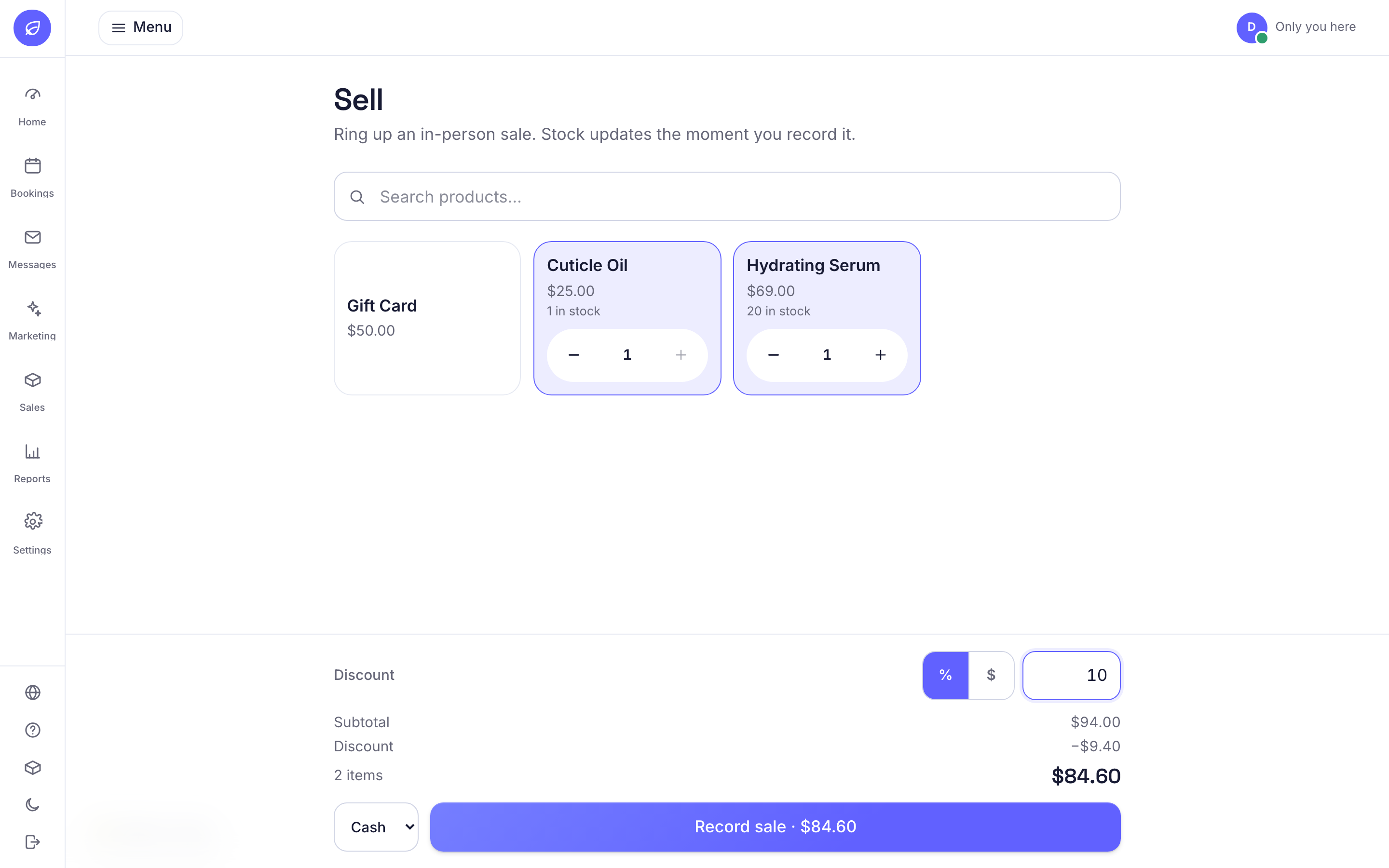
Bookatu has a Sell screen in the admin, made for a phone at the counter. It is a grid of your products with big tiles, so it works with one thumb while a client is standing there. Tess tapped the serum tile, then the top coat tile, and both were in the sale. Tapping a tile again adds another one, and small plus and minus buttons fix a slip. Each tile shows the price and, for anything you track, how many are on the shelf. A sold-out product says so right on the tile and cannot be added, so you never ring up a bottle you do not have. If your shelf is bigger than a screen, a search box at the top narrows it by name, brand, or category.
Ten percent off, decided at the counter
The client is in every three weeks, so Tess wanted to take something off. At the bottom of the Sell screen there is a discount row. A small toggle picks between a percentage and a dollar amount, and a box takes the number. Tess tapped the percent side and typed 10. The bar underneath showed the subtotal, the discount coming off, and the new total, all before anything was recorded. If you type the wrong number, the total simply follows you while you fix it. The discount is also capped at the subtotal, so no typo can drag a sale below zero.
Record it, and the shelf already knows
The last step is how it was paid. There is a plain dropdown for Cash, Card, or Other, because the money itself moves the way it always did, through your card machine or into the cash drawer. Tess picked Card and tapped Record sale. The stock count dropped at that moment. The products page showed one less serum and one less top coat, and if that serum had just reached its reorder point it would already be wearing a Low stock tag. There is a quiet honesty check built in too. If the screen was stale and the last unit had already gone out, Bookatu records only what was really on hand, so a sale never claims a bottle that did not exist.
Every recorded sale becomes a line in the stock ledger. Each line keeps:
- The date and time, and which product went out.
- The price each unit actually sold for, after the discount. Not the sticker price.
- How it was paid and the discount you gave, in a short note like POS · Card · 10% off.
- The reason for the movement, so a sale never gets mixed up with a delivery or a stock correction.
The discount is split fairly, down to the cent
Here is the part you would never want to do by hand. A 10 percent discount off the whole sale has to be shared between the serum and the top coat, and the cents rarely divide evenly. Bookatu spreads the discount across the items in proportion to what each one cost, then settles any leftover cent so the per-item prices in the ledger add up to exactly what the client paid. No line ever goes negative, and nothing gets rounded away. It sounds fussy, and it is, which is exactly why software should be the one doing it. Your ledger and the total on the screen always agree, to the cent.
The point of ringing up a sale is not the moment the money changes hands. It is that six months later you can say exactly what left the shelf and what it sold for.
Tax time is a download, not a dig
When your accountant asks about retail sales, the answer is a button. The ledger lives under Products, and it exports to a CSV with the date, the product, the quantity, the unit price, and the note that says how it was paid. Every counter sale you rang up through the year is already in there, discounts included. Tess used to reconstruct her retail takings from card statements and memory. Now the record is written at the same moment as the sale, by the same tap that rang it up.

None of this asks Tess to change how she works. The client still pays the way she always did. The difference is that the sale is now a fact in her books instead of a guess in her head. Two taps for the products, one number for the discount, one tap to record. The shelf count stays right, the ledger stays right, and there is nothing left to write down after the client has gone.


